
Add new government bonds to Wallible
If the government bond you are looking for is not yet available on Wallible, you can easily request its addition via the appropriate function on the platform.
How to apply for a new government bond
If the ISIN of the government bond you’re looking for doesn’t appear in the search results on Wallible, you can add it manually in just a few steps.
1. ISIN search
Enter the ISIN in the search bar within the Gov Bond (Beta) section. If the title is not available, the button will appear:
“Add Government Bond”

2. Entering data
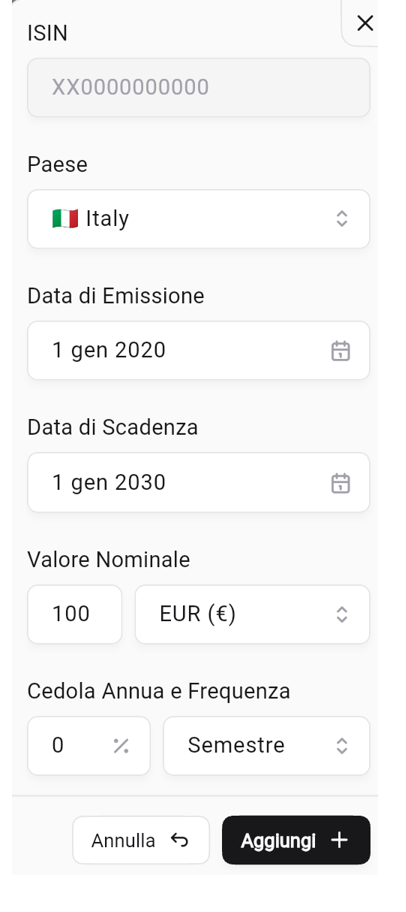
By clicking on the button, a form will open where you can enter the main information about the bond. Here are the required fields:
ISIN The unique identification code of the bond (e.g. IT0001247391).
Village The issuing state of the bond (e.g. Italy).
Issue Date The date the bond was issued and began circulation.
Expiration Date The date on which the capital will be repaid by the issuer.
Nominal Value The nominal amount of the security (for example 100). It is the value on which interest is calculated.
Annual Coupon and Frequency
- The percentage of annual interest paid by the bond.
- The payment frequency (e.g. semi-annually, annually, etc.).
3. Confirm addition
After filling in the fields:
- Press “Add +” to save the bond.
- Or click “Cancel” if you want to stop the operation.
Advantages
Thanks to this function:
- You can enrich the Wallible database with missing titles.
- Keep your dashboard updated with all the bonds you own or want to track.
- Help the community build a more complete database.